Now Reading: Your Ultimate Guide to FFXIV Mods
-
01
Your Ultimate Guide to FFXIV Mods

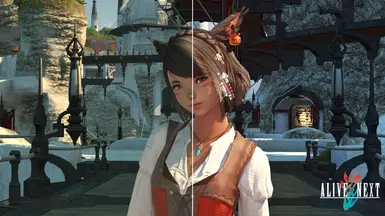
Welcome, Warrior of Light! Whether you’re a seasoned veteran of Eorzea or just starting your journey, you’ve likely heard whispers about the world of ffxiv mods. These player-made modifications can transform your game, from subtle quality-of-life tweaks to complete visual overhauls. But diving in can feel a bit overwhelming. What are they? Are they safe to use? And how do you even get started?
Fear not. This comprehensive guide will walk you through everything you need to know about using ffxiv mods. We’ll cover the different types of mods available, the essential tools you’ll need, and how to install them safely. By the end, you’ll have the confidence to customize your Final Fantasy XIV experience just the way you like it.
Key Takeaways
- What FFXIV Mods Are: Player-created modifications that alter the game’s visuals, user interface, and sound. They operate on the client-side, meaning only you can see their effects.
- Official Stance: Square Enix’s official policy prohibits the use of any third-party tools, including mods. Using them carries a potential risk, though enforcement typically targets players who gain an unfair advantage or harass others.
- Types of Mods: The most common mods include UI enhancements (like custom HUDs), cosmetic changes (new hairstyles, gear, and character models), and shader packs that dramatically improve graphics.
- Essential Tools: Programs like XIVLauncher and TexTools are the backbone of the modding community, making installation and management straightforward.
- Safety First: The golden rule of modding is to never talk about it in-game. Discretion is key to enjoying mods without drawing unwanted attention from Game Masters (GMs).
What Exactly Are FFXIV Mods?
At its core, a “mod” is short for modification. In the context of Final Fantasy XIV, ffxiv mods are custom files created by talented fans that alter or add to the game’s existing assets. It’s important to understand that these changes are purely client-side. This means any modifications you install are only visible on your computer. Other players in the game will still see your character and the world with the default, unmodified assets.
Think of it like redecorating your own room. You can change the paint, hang up new posters, and rearrange the furniture. To you, the room looks completely different and personalized. But to anyone outside, the house looks exactly the same as it did before. That’s how ffxiv mods work; they customize your personal view of Eorzea without affecting anyone else’s gameplay experience. This distinction is crucial, as it separates cosmetic modding from hacking or cheating, which directly impacts the game server and other players.
Client-Side vs. Server-Side Changes
Understanding the difference between client-side and server-side is fundamental to understanding ffxiv mods.
- Client-Side: This is your computer. All game files, from character models to the buttons on your screen, are stored locally. Mods work by replacing or altering these local files. When you install a mod for a new hairstyle, you are simply telling your PC to display the modded file instead of the original one. The game server, which handles all the important stuff like combat calculations and player location, is completely unaware of this change.
- Server-Side: This is Square Enix’s computer. It dictates the rules of the game world. Things like your character’s stats, inventory items, and quest progression are all stored and managed here. You cannot use mods to change server-side information. You can’t give yourself more gil, unlock a mount you haven’t earned, or make your attacks do more damage. Attempting to do so would be considered cheating and is a surefire way to get your account banned.
Is Using FFXIV Mods Allowed? The Official Stance
This is the most critical question for any aspiring mod user, and the answer is straightforward: No. Square Enix’s official Terms of Service (ToS) strictly prohibit the use of any third-party tools or applications that interact with or modify the game client. This is a blanket policy that includes everything from damage meters and cosmetic ffxiv mods to outright cheating software.
The policy states: “You may not use any third-party software or tools to automate gameplay, obtain an unfair advantage, or otherwise modify the game experience.” From Square Enix’s perspective, they cannot vet every single mod for safety or intent. A broad prohibition is the simplest way for them to maintain a level playing field and ensure the integrity of their game. They want every player to have the same core experience, and third-party modifications disrupt that vision.
Understanding the Risks and “Don’t Ask, Don’t Tell”
While the official rule is a firm “no,” the reality of enforcement is more nuanced. The community generally operates on a “Don’t Ask, Don’t Tell” policy. Square Enix’s Game Masters (GMs) do not actively scan your computer for mod files. They primarily act on player reports. This means you are unlikely to get into trouble for simply using cosmetic ffxiv mods for your own private enjoyment.
However, the risk of disciplinary action, including temporary suspension or a permanent ban, becomes very real if you:
- Talk about using mods in the game. This includes in-say, party, or FC chat. Discussing or admitting to mod use is providing direct evidence against yourself.
- Stream or post videos showing identifiable modded content. If your character’s name is visible alongside obvious mods, you are creating public evidence.
- Use mods to harass or bully other players. For example, using a tool to inspect another player’s gear and then mocking them for it is a serious offense.
- Use mods that provide a clear gameplay advantage. This includes things like bots that automate crafting or plugins that call out mechanics for you before they are visually apparent.
The golden rule is discretion. Enjoy your mods quietly, and never impose them on others.
Getting Started: Essential Tools for Modding
Before you can start downloading glamorous new outfits, you need the right tools to manage and install them. The ffxiv mods community has developed some incredible software that makes the process much easier than you might think. Two programs are considered essential: XIVLauncher and TexTools.
XIVLauncher: Your New Game Client
XIVLauncher is a custom, open-source launcher for Final Fantasy XIV that acts as a gateway to the world of plugins and mods. It replaces the standard FFXIV launcher and offers a host of quality-of-life improvements. Its most important feature is Dalamud, a plugin framework that allows you to install a wide array of helpful add-ons directly into your game.
Key Features of XIVLauncher:
- Plugin Management: Easily browse, install, and update Dalamud plugins.
- Saved Password: Stores your login credentials securely so you don’t have to enter them every time.
- Faster Launch: Skips the original launcher’s checks, getting you into the game quicker.
To get started, you simply download XIVLauncher from its official website, run the installer, and point it to your Final Fantasy XIV game directory. From then on, you will launch the game through it instead of the default icon.
TexTools: The Heart of Cosmetic Modding
If XIVLauncher is the gateway, TexTools is the engine for nearly all cosmetic ffxiv mods. This powerful application is designed specifically for managing and installing mod files that replace the game’s textures, models, and sounds. It allows you to browse mod packs, preview changes, and install or uninstall them with just a few clicks.
TexTools works by creating a backup of your original game files and then carefully injecting the modded files into the game’s data archives. It keeps track of everything you’ve installed, making it easy to remove mods or resolve conflicts if two mods try to change the same item. Anyone serious about cosmetic modding will need to become familiar with TexTools. It has a bit of a learning curve, but the official tutorials and community guides are excellent resources.
The Different Types of FFXIV Mods
The world of ffxiv mods is vast and varied. Players have created modifications for nearly every aspect of the game’s presentation. Generally, they fall into a few main categories, each offering a different kind of enhancement.
1. User Interface (UI) and Heads-Up Display (HUD) Mods
These are some of the most popular and practical mods. They alter the on-screen elements to provide more information or present it in a cleaner, more customized way.
- Custom HUD Layouts: While the game allows for extensive HUD customization, some plugins allow for even more radical redesigns.
- Detailing Job Gauges: Mods that make job-specific gauges larger, more prominent, or more visually appealing.
- Enhanced Target Bars: Plugins that can show cast bars on your target’s target or display party buffs more clearly.
These types of UI modifications are typically handled through Dalamud plugins installed via XIVLauncher. They are powerful tools for raiders and anyone looking to optimize their gameplay information flow.
2. Cosmetic and Visual Mods
This is the largest and most diverse category of ffxiv mods. These mods are all about changing how things look in your game. They do not provide any gameplay advantage and are purely for personal aesthetic enjoyment.
Character Customization
Players love personalizing their Warriors of Light, and mods open up a universe of possibilities beyond the default character creator.
- New Hairstyles and Faces: Modders have created thousands of custom hairstyles, face textures, makeup, and scar options.
- Custom Tattoos and Body Features: Add full-body tattoos, scales for Au Ra, or unique eye colors.
- Character Model Swaps: Ambitious mods that can change a character’s base model, such as swapping a Miqo’te for a Viera but with Miqo’te animations.
Gear and Glamour Mods
Fashion is the true endgame for many FFXIV players, and ffxiv mods take it to another level.
- New Outfits: Entirely new, custom-designed outfits that replace existing in-game gear pieces.
- Gear “Upscaling”: High-resolution texture replacements that make old, low-res gear look sharp and modern.
- ColorSet Editing: Mods that allow you to dye the undyeable parts of gear, giving you complete color control.
These cosmetic mods are almost always installed using TexTools. You download a mod pack (usually a .ttmp2 file) and import it into the application.
3. Graphics and Shader Mods (GShade/ReShade)
If you’ve ever seen a breathtaking FFXIV screenshot with cinematic lighting and vibrant colors, you’ve likely seen a shader mod in action. These are not “mods” in the traditional sense of replacing game files. Instead, they are post-processing injectors that apply a layer of graphical effects over the game’s rendered image.
Programs like GShade (a fork of ReShade tailored for FFXIV) allow you to apply preset filters to your game in real-time. These filters can:
- Adjust brightness, contrast, and color saturation.
- Add advanced lighting effects like ambient occlusion (better shadows).
- Sharpen the image for a clearer picture.
- Introduce cinematic effects like depth of field.
Using shaders is one of the safest forms of modding, as they don’t modify any game files at all. They simply “paint” over the final image before it’s displayed on your monitor.
4. Sound and Music Mods
Less common but still popular, sound mods allow you to change the audio landscape of Eorzea. This could involve swapping out combat sound effects for punchier ones, replacing certain background music tracks with your favorite songs, or even changing the voice lines for minions and mounts. Like cosmetic mods, these are typically handled with TexTools.
How to Install FFXIV Mods: A Step-by-Step Guide
Ready to take the plunge? Here is a basic walkthrough for getting started with cosmetic mods, the most common entry point for new users.
Step 1: Install Your Tools
- Download and install XIVLauncher. Run it once and let it set up.
- Download and install TexTools. When you first run it, you will need to point it to your game’s directory, specifically the
ffxiv_dx11.exefile.
Step 2: Find Your Mods
- The primary community hub for ffxiv mods is a site called XIV Mod Archive. Here you can browse thousands of mods, filter by category, and see previews.
- Other sources include dedicated Discord servers and creator-specific websites. Always download from reputable sources to avoid malicious files. For excellent guides and tech news, resources like
https://forbesplanet.co.uk/can offer insights into staying safe online.
Step 3: Download and Prepare the Mod
- Cosmetic mods for TexTools usually come in a
.ttmp2or.zipfile. - If the mod is in a zip file, extract its contents. You should find the
.ttmp2file and often a folder of images showing you what the mod looks like and what gear it replaces.
Step 4: Install with TexTools
- Open TexTools.
- Click the “Mods” button and then “Import Modpack.”
- Navigate to your downloaded
.ttmp2file and select it. - TexTools will show you a description of the mod and the files it affects. Review this information and click “Import.”
- The mod will now appear in your “Mod List.” To activate it, simply make sure the “Enabled” box next to its name is checked.
Step 5: Launch the Game
- Launch Final Fantasy XIV using XIVLauncher.
- Log in and find the item that the mod replaces. If you installed a hairstyle mod, visit the Aesthetician. If you installed a gear mod, equip or glamour the corresponding piece. You should now see your mod in action!
|
Tool |
Primary Use |
Installation Method |
Ease of Use |
|---|---|---|---|
|
XIVLauncher |
Custom game launcher, plugin management |
Standalone Installer |
Very Easy |
|
TexTools |
Cosmetic mod management (gear, hair, etc.) |
Standalone Installer |
Intermediate |
|
GShade/ReShade |
Graphical filters and post-processing |
Standalone Installer |
Easy to Intermediate |
Best Practices for Safe Modding
Enjoying ffxiv mods while minimizing risk comes down to being smart and discreet. Follow these best practices to protect your account and your game.
The Golden Rule: Keep Quiet
As mentioned before, never, ever talk about using mods within the game itself. This is the single most important rule. Don’t mention TexTools, XIVLauncher, specific plugins, or that your character’s cool glamour is a mod. To anyone in-game, you are playing the standard, unmodified version of FFXIV.
Vet Your Mod Sources
Only download mods from well-known, reputable websites like the XIV Mod Archive. Be cautious of random links or files shared by unknown users. While rare, it is possible for malicious files to be disguised as mods. The major community platforms have safeguards in place, but it’s always good to be careful.
Keep Your Mods Updated
When Square Enix releases a major game patch, it often changes the game’s file structure. This can “break” your existing mods, causing visual glitches or even game crashes. Mod creators are usually quick to update their work for new patches. It’s good practice to disable all mods before a major patch day and then check for updated versions afterward. TexTools and XIVLauncher both have features to help manage this process.
Understand Mod Conflicts
Sometimes, two different mods might try to alter the same in-game item. For example, you might have two mods that both try to replace the “Calfskin Rider’s Jacket.” TexTools will warn you about these conflicts. You will have to choose which mod you want to take priority. Being aware of this can save you a headache trying to figure out why a mod isn’t showing up correctly.
Frequently Asked Questions (FAQ)
Q1: Can other players see my ffxiv mods?
No. All mods are client-side only. Other players will only see the default game assets on your character. The only exception is if they have the exact same mod file installed.
Q2: Will using ffxiv mods get my account banned?
There is always a risk, as it is technically against the Terms of Service. However, if you stick to cosmetic or UI mods and follow the “Don’t Ask, Don’t Tell” rule, the risk is extremely low. Bans are almost exclusively issued for cheating, harassment, or openly discussing mod use in-game.
Q3: Can mods harm my computer or my game files?
If you download from reputable sources, the risk is minimal. Tools like TexTools are designed to safely manage your game files and create backups. If a mod causes a problem, you can usually disable it or have TexTools restore the original files to fix the issue.
Q4: Do I need a powerful PC to use ffxiv mods?
For most cosmetic and UI mods, no. They have a negligible impact on performance. The exception is graphical shader mods (GShade/ReShade). Heavy shader presets can be demanding and may lower your frame rate, especially on older hardware.
Q5: What happens on patch day?
Major patches often break mods. It is highly recommended to disable all your mods before the game updates. After the patch is live, wait for mod authors to release updated versions of their creations. Using outdated mods on a new patch can cause crashes and visual bugs.
Conclusion: Customize Your Eorzean Adventure
The world of ffxiv mods offers a fantastic way to personalize and enhance your Final Fantasy XIV experience. From practical UI improvements that streamline your gameplay to stunning visual overhauls that make Eorzea more beautiful than ever, there is a mod for almost every taste. The tools created by the community have made installation and management accessible to everyone.
While it’s crucial to remember the official stance from Square Enix and the inherent risks, a responsible and discreet approach allows hundreds of thousands of players to enjoy this creative side of the FFXIV community without issue. By following the golden rule of silence, using trusted tools, and respecting your fellow players, you can safely unlock a new level of customization. Dive in, explore the possibilities, and make your Warrior of Light truly your own.
Stay Informed With the Latest & Most Important News
Previous Post
Next Post











Advertisement