Now Reading: Everything You Need to Know About Using a Fake GPS
-
01
Everything You Need to Know About Using a Fake GPS

Key Takeaways
- Location Spoofing: A fake gps allows you to trick your device into thinking it is somewhere else in the world.
- Privacy Protection: Many people use location spoofing to hide their real location from apps that track data aggressively.
- Testing and Development: App developers frequently use these tools to test how their software behaves in different cities.
- Safety First: While generally safe, using these tools can sometimes breach the terms of service for certain apps, especially games.
In the modern digital landscape, our smartphones are constantly communicating with satellites to pinpoint exactly where we are standing. This technology is incredibly useful for finding the nearest pizza place or navigating through heavy traffic, but sometimes, you might want a little more control over your digital footprint. This is where the concept of a fake gps comes into play. It isn’t just about tricking your phone; it’s about reclaiming privacy, accessing region-locked content, or simply having a bit of fun. Whether you are a tech enthusiast or just someone concerned about how much data you are sharing, understanding how location spoofing works is a valuable skill in today’s connected world.
We are going to dive deep into the world of location spoofing. We will cover why people do it, how to set it up on different devices, and the potential risks involved. By the end of this guide, you will be an expert on how to manage your digital location effectively. It’s easier than you might think, and you don’t need to be a computer genius to get started.
What Is a Fake GPS and How Does It Work?
At its core, a fake gps is a tool or application that feeds false location data to your device’s operating system. Normally, your phone uses a built-in chip to receive signals from satellites orbiting the Earth. These signals calculate your precise longitude and latitude. When you use a spoofing app, you essentially intercept that communication channel. Instead of the operating system reporting your actual coordinates based on satellite data, the app tells the system, “Hey, we are actually in Paris right now,” even if you are sitting on your couch in New York.
The process involves enabling specific developer settings on your phone, particularly on Android devices. These settings allow “mock locations,” which is a feature originally designed for developers who need to test location-based apps without traveling around the world. When you activate a fake gps app, it takes over the location provider service on your phone. From that point on, any app asking “Where am I?”—whether it is Google Maps, Instagram, or a weather app—gets the answer provided by your spoofing tool rather than the real satellite chip.
Understanding this mechanism is crucial because it highlights that you aren’t hacking satellites; you are simply modifying the data your phone processes. This distinction is important because it means the “hack” is local to your device. The satellites still know where you are, but your phone ignores them. It’s a clever software trick that has become incredibly popular for a variety of legitimate reasons, ranging from privacy concerns to software testing.
Top Reasons Why People Use Location Spoofing
There are countless reasons why someone might want to use a fake gps. One of the most common motivations is privacy. In an era where almost every app wants to know your location, some users feel uncomfortable sharing their movements 24/7. By spoofing your location, you can prevent social media apps, advertisers, and even stalkers from knowing exactly where you live or work. It adds a layer of anonymity that is hard to achieve otherwise in a smartphone-dominated world.
Another massive driver for location spoofing is accessing geo-restricted content. Streaming services often have different libraries for different countries. A movie available on Netflix in the UK might not be available in the US. By changing your location, you can sometimes trick these services into unlocking content that is otherwise hidden behind a digital border. Similarly, sports blackouts often prevent local fans from watching home games; a fake gps can make it appear as though you are watching from a different state, bypassing the blackout restrictions entirely.
Finally, mobile gaming has been a huge catalyst for this technology. Games that rely on real-world movement, like collecting monsters or claiming territories, often require you to physically travel to specific landmarks. For people living in rural areas or those with mobility issues, this can be impossible. A fake gps allows them to participate in the game by moving a joystick on their screen rather than walking miles down the road. It levels the playing field, although game developers often frown upon this practice.
How to Set Up Fake GPS on Android Devices
Setting up a fake gps on Android is generally straightforward because the operating system is more open than its competitors. The first step is to download a reliable spoofing app from the Google Play Store. There are many options available, both free and paid. Look for apps with high ratings and recent updates to ensure compatibility with the latest Android versions. Once the app is installed, you cannot simply open it and start spoofing; you need to do a little bit of preparation in your phone’s settings menu.
You must enable “Developer Options” on your Android phone. To do this, go to your phone’s Settings, find the “About Phone” section, and tap on “Build Number” seven times rapidly. You will see a small message pop up saying, “You are now a developer!” Once this hidden menu is unlocked, go back to the main Settings menu, find “Developer Options,” and scroll down until you see “Select mock location app.” Tap this and select the fake gps app you just downloaded. This grants the app the necessary permission to override your real GPS hardware.
Now, open your chosen app. You will typically see a map of the world. You can zoom in and drop a pin anywhere you like—maybe the Eiffel Tower or a beach in Hawaii. Once you have selected your target location, hit the “Start” or “Play” button within the app. Your phone’s status bar might show a notification that the service is running. If you open Google Maps now, you should see yourself at the new location. It is that simple! To stop, just go back to the app and hit “Stop.”
The Challenges of Spoofing on iOS (iPhone)
Unlike Android, Apple does not make it easy to use a fake gps on an iPhone or iPad. iOS is a “walled garden,” meaning Apple strictly controls what apps can and cannot do. There is no simple “mock location” setting available to the average user in the standard settings menu. Because of this, spoofing on an iPhone usually requires more effort and sometimes even external hardware. You generally cannot just download an app from the App Store and expect it to work system-wide like on Android.
One common method for iOS users involves connecting the iPhone to a computer (Mac or PC). There are desktop software programs designed specifically to push a fake location to your connected iOS device. Programs like iAnyGo or 3uTools allow you to select a location on your computer screen, which is then forced onto your iPhone. This works well, but the downside is that you have to be tethered to a computer, or at least sync with it initially. As soon as you restart your phone, the location usually resets to your real position.
Another method involves “jailbreaking” the iPhone, which removes Apple’s software restrictions. Once jailbroken, you can install specialized tweaks that allow for system-wide location spoofing directly on the device. However, jailbreaking voids your warranty and can expose your phone to security risks, so it is not recommended for the average user. Because of these hurdles, many serious location spoofers prefer using a cheap, secondary Android device solely for their spoofing needs while keeping their main iPhone secure and unmodified.
Using Fake GPS for Social Media Privacy
Social media platforms are notorious for tracking user data. When you post a photo on Instagram, check in on Facebook, or send a Snap, your location is often tagged or logged in the background. Over time, these companies build a detailed profile of your daily habits: where you sleep, where you work, and where you hang out on weekends. Using a fake gps is a proactive way to confuse these algorithms and protect your personal privacy.
For example, if you want to post a photo but don’t want people to know you are currently at home, you can spoof your location to a generic spot in your city, or even a different city entirely. This is particularly useful for influencers or public figures who need to maintain an online presence but also face safety concerns regarding stalkers. By consistently varying your digital location, you make it much harder for anyone to pinpoint your actual real-time whereabouts.
Additionally, dating apps like Tinder or Bumble rely heavily on location to show you potential matches nearby. If you are planning a trip to a new city next week and want to start matching with people there ahead of time, a fake gps is the perfect tool. You can virtually transport yourself to your destination city, set up dates, and hit the ground running when you actually arrive. It transforms how you use these social discovery apps, giving you more flexibility and control over who sees your profile.
Common Uses for Location Spoofing on Social Media
|
Social Platform |
Common Use Case |
Benefit |
|---|---|---|
|
|
Tagging exotic locations |
Increases engagement and protects real location |
|
Snapchat |
Accessing geo-filters |
Unlock exclusive filters from other cities |
|
Tinder/Bumble |
Matching in other cities |
Plan dates before traveling to a new location |
|
|
“Checking in” anywhere |
Prank friends or hide actual whereabouts |
|
|
Sharing live location |
send a fake live location for safety or privacy |
Risks and Dangers Involved with Location Spoofing
While using a fake gps is generally harmless, it is not without risks. The most immediate danger is violating the Terms of Service (ToS) of the apps you are using. Mobile games like Pokémon GO take cheating very seriously. If their systems detect that your location is jumping impossibly fast between countries or behaving unnaturally, they may “soft ban” you (preventing you from catching anything) or permanently ban your account. Losing an account you have spent years building is a painful consequence.
There are also technical glitches to consider. sometimes, after you stop using a spoofing app, your phone’s GPS can get “stuck” at the fake location. You might turn off the app, but Google Maps still thinks you are in Tokyo. This can be frustrating when you are trying to use your GPS for actual navigation. Usually, restarting the phone or toggling the location services off and on fixes this, but in rare cases, it requires clearing the cache of your location storage, which can be a technical headache for some users.
Lastly, there is a small security risk with the spoofing apps themselves. Since these apps require deep permissions to override system settings, you need to trust the developer. Malicious apps could potentially misuse these permissions to harvest data from your phone. Always stick to reputable apps with high download counts and read the reviews carefully. Avoid downloading random APK files from unknown websites, as these are prime vectors for malware.
How to Stay Safe While Spoofing
- Respect Cool-down Times: If you jump from New York to London in a game, wait the amount of time a real flight would take before interacting with the game.
- Use a VPN: Combining a VPN with your spoofing adds an extra layer of security and makes your location change look more realistic to servers.
- Read Reviews: Only download apps from the official Play Store or trusted developer sites.
- Don’t Root/Jailbreak: Unless you are an expert, avoid rooting your phone as it opens up significant security vulnerabilities.
Fake GPS for App Developers and Testers
For software developers, a fake gps is not a toy; it is an essential professional tool. Imagine you are building a taxi-hailing app or a food delivery service. You need to ensure that the app calculates fares correctly in London, New York, and Tokyo. It isn’t feasible to fly your QA team to every city just to test a feature. Instead, developers use location spoofing to simulate these environments right from their office desks.
This testing capability ensures that apps work correctly across different time zones and geographic coordinates. For example, a weather app needs to display the correct temperature for the location the user is in. By spoofing their location, a tester can verify that the app switches from Fahrenheit to Celsius correctly depending on the region, or that it displays severe weather alerts relevant to that specific area. Without this technology, global app development would be significantly slower and more expensive.
Furthermore, developers use these tools to test geofencing capabilities. Geofencing is when an app triggers an action when a user enters or leaves a specific area—like a smart home app turning on the lights when you pull into the driveway. Developers can use a fake gps to simulate walking in and out of that zone repeatedly to ensure the trigger works perfectly every time, refining the user experience before the product ever hits the market.
Exploring the World Virtually
Beyond privacy and work, using a fake gps can be a fantastic educational tool. You can use it to explore Google Maps or Google Earth as if you were actually there. By setting your location to a specific street in Rome, you can use apps that offer “nearby” recommendations to see what restaurants, museums, and shops are popular in that neighborhood. It is a unique way to research a travel destination before you book your tickets.
This virtual tourism allows you to get a “local’s” perspective. When you open Yelp or TripAdvisor with a spoofed location, the app treats you as a resident. You might see different recommendations than you would searching from abroad. You can check out the local traffic patterns at different times of the day or see which transit lines are currently delayed. It is a more immersive way of planning a trip than simply looking at static maps.
For students, this can be an engaging way to learn geography. Teachers can have students “travel” to different coordinates to find clues or answer questions about local landmarks. It turns abstract coordinates into a tangible digital experience. While it doesn’t replace real travel, it brings the world a little closer and makes the vastness of our planet more accessible from a classroom or living room.
Impact on Battery Life and Performance
Running a fake gps app does have an impact on your device’s battery life, although it is usually manageable. When your phone is constantly overriding system commands and processing fake coordinates, the CPU has to work slightly harder than usual. Additionally, if you are running a heavy game or map application simultaneously, the battery drain will be noticeable. It is similar to using your real GPS for navigation—it consumes power.
However, some users actually report better battery life in specific scenarios. Real GPS chips are power-hungry because they constantly search for satellite signals, which drains the battery rapidly, especially in areas with poor reception. If you are spoofing a stationary location, your phone stops searching for satellites. The software override can sometimes consume less power than the hardware radio constantly pinging the sky. This varies heavily depending on the specific app and device you are using.
Regarding performance, modern smartphones are powerful enough that a simple background spoofing app won’t cause significant lag. However, on older devices with limited RAM, you might experience some slowdowns if you are multitasking. It is best to close other unnecessary background apps when you are spoofing to ensure the smoothest experience possible. Keeping your phone cool is also important; if the device heats up, performance will throttle, so avoid spoofing while charging if the phone feels hot.
Legal and Ethical Considerations
Is using a fake gps illegal? Generally, no. In most countries, including the US, modifying your own device’s data for personal use is not a crime. You own the hardware, and you have the right to control the data it broadcasts. However, the legality can get murky depending on how you use it. Using spoofing to commit fraud, such as faking delivery routes for a job or tricking a court-ordered ankle monitor (which uses different tech, but the principle applies), is absolutely illegal and carries severe penalties.
Ethically, the gray area is mostly within the realm of competitive gaming and service terms. If you use a spoofer to gain an unfair advantage in an online game, you are ruining the experience for other players who play legitimately. This is considered unethical in the gaming community. Similarly, using spoofing to bypass regional pricing (e.g., buying software in a country where it is cheaper) violates the terms of sale and is ethically questionable, bordering on fraud in some jurisdictions.
For the average user simply wanting to protect their privacy or watch a show from back home, the ethical implications are minimal. It is a tool for personal autonomy. As long as you aren’t harming others or defrauding a business, using a fake gps is widely considered a legitimate exercise of control over your personal technology. As we discuss digital rights, resources like Forbes Planet often explore the intersection of technology and lifestyle, highlighting the importance of digital tools in modern life.
Troubleshooting Common Issues
Even with the best apps, things can go wrong. A common issue is “rubber-banding.” This happens when your phone quickly jumps back and forth between your fake location and your real location. This occurs because the real GPS signal is strong and momentarily overrides the fake one. To fix this, some users wrap their phones in aluminum foil (creating a Faraday cage) to block the real GPS signal, although this is a bit extreme. A better software fix is to ensure your spoofing app has “fused location” disabled or is set to a higher update frequency.
Another issue is the “Failed to detect location” error (often seen in Pokémon GO). This usually means the app detects that you have “Developer Options” enabled. Some advanced spoofing apps have a “smali patcher” or “hide mock locations” feature that requires a rooted device. This hides the fact that you are spoofing from other apps. If you aren’t rooted, simply ensuring your spoofing app is up to date is the best defense, as developers constantly patch these detection methods.
If your GPS refuses to reset after you stop spoofing, don’t panic. First, make sure the spoofing app is completely closed (swipe it away from recent apps). Then, toggle your location off and on in the quick settings. Open Google Maps and tap the “my location” target icon. If it is still stuck, restart your phone. In 99% of cases, a reboot clears the temporary override and forces the phone to re-engage with the hardware GPS chip.
Advanced Spoofing: Joysticks and Routes
Basic spoofing involves teleporting to one spot and staying there. Advanced fake gps apps offer much more functionality, such as on-screen joysticks. This overlay allows you to “walk” around a digital map in real-time. You push the joystick forward, and your blue dot on Google Maps moves forward. This is incredibly popular for gamers who need to hatch eggs or explore areas without physically moving. It adds a dynamic element to the spoofing experience.
You can also create automated routes. You can set a start point and an end point, and tell the app to walk between them at a human speed. You can even add waypoints to create a complex path through a city. This is useful for simulating a commute or a jog. The app will automatically move your location along the roads, pausing at intersections if programmed, making the movement look indistinguishable from real travel data.
GPX files are another advanced feature. A GPX file is a saved GPS route. You can download GPX routes created by other users—for example, a route that hits all the best tourist spots in Tokyo. You load this file into your spoofing app, and it automatically takes you on that tour. It is a powerful way to share location experiences and automate movement for testing or gaming purposes.
The Future of Location Privacy
As technology advances, the battle between location tracking and location spoofing will intensify. Operating systems are becoming more secure, making it harder to spoof without detection. Android 12 and 13, for instance, introduced “approximate location” permissions, allowing users to give apps a rough idea of where they are (like “in Chicago”) without giving exact street coordinates. This reduces the need for spoofing for privacy, as the system itself offers a middle ground.
However, the demand for fake gps tools will likely remain high. As the Metaverse and augmented reality (AR) technologies grow, our physical location will become even more tied to our digital experiences. People will want to visit virtual concerts or events that are geo-locked to specific physical locations. Spoofing will be the key to accessing this global digital layer without the cost of physical travel.
We might also see more built-in privacy tools from smartphone manufacturers. Just as Apple introduced “App Tracking Transparency,” future phones might have a native “Virtual Location” toggle in the privacy settings, allowing users to select a temporary home base for all apps. Until then, third-party apps will continue to fill this gap, providing users with the tools they need to control their own data.
Best Free and Paid Apps to Consider
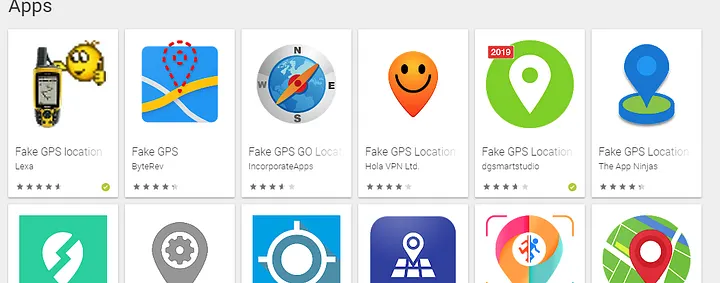
When looking for a fake gps app, the choices can be overwhelming. On Android, “Fake GPS location” by Lexa is a classic choice. It is free, simple, and reliable. It doesn’t have many fancy features, but it works perfectly for basic teleportation. For more advanced features like joysticks, “GPS Joystick” by The App Ninjas is highly recommended. It includes privacy modes and route automation, making it a favorite among gamers.
For iOS users who don’t want to jailbreak, desktop-based solutions like iMyFone AnyTo or Tenorshare iAnyGo are popular paid options. They offer stable connections and a user-friendly interface but require a subscription fee. These tools are often updated to keep up with the latest iOS security patches, providing a smoother experience than free alternatives which often stop working after an Apple update.
Always be wary of “completely free” apps that ask for too many permissions or are filled with intrusive ads. Developing these apps takes time and effort; if an app is free, you might be the product (via data collection). Paying a few dollars for a “Pro” version of a reputable app is often worth it for the ad-free experience and the peace of mind that comes with better privacy standards.
FAQ Section
Q: Is using a fake gps safe for my phone?
A: Yes, it is generally safe. It is a software modification that does not damage your hardware. However, always download apps from trusted sources to avoid malware.
Q: Can I get banned from Pokémon GO for spoofing?
A: Yes. Niantic, the developer of Pokémon GO, actively bans players who use spoofing tools. Use them at your own risk and respect cool-down times to minimize detection.
Q: Does spoofing work on all apps?
A: Most apps that rely on standard GPS data will be fooled. However, some sophisticated apps use Wi-Fi and Bluetooth scanning to verify location, which might conflict with your spoofed coordinates.
Q: Do I need to root my Android phone?
A: No, basic spoofing works without root. However, advanced features that hide the spoofing from detection often require root access.
Q: Why does my location jump back to the real one?
A: This is called “rubber-banding.” It happens when your real GPS signal is stronger than the fake signal. Try using the app indoors or wrapping your phone in foil to block satellite signals.
Conclusion
Mastering the use of a fake gps gives you a powerful level of control over your digital life. Whether you are trying to safeguard your privacy from prying eyes, test a new application you are developing, or just catch a rare monster in a game, these tools offer flexibility that standard smartphone settings simply don’t provide. We have covered the setup process, the exciting benefits, and the necessary precautions to keep your device and accounts safe.
As we move forward into an increasingly connected future, the ability to manage your location data will become a standard part of digital literacy. Remember to use these tools responsibly and ethically. Technology is meant to serve us, and knowing how to manipulate it to suit your needs is the mark of a savvy modern user. For more technical definitions and the history of the Global Positioning System, you can always check out the entry on Wikipedia to deepen your understanding of the incredible technology we use every day.
Related Posts



Stay Informed With the Latest & Most Important News
Previous Post
Next Post











Advertisement