Now Reading: Cat5 and Cat5e Cable: Your Complete Guide to Network Wiring
-
01
Cat5 and Cat5e Cable: Your Complete Guide to Network Wiring

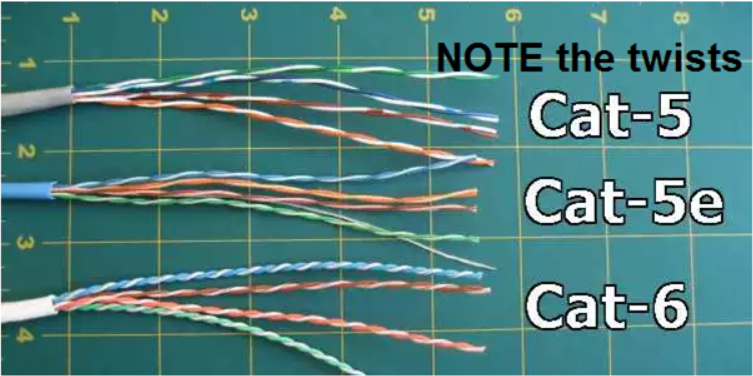
Setting up a home or office network can feel like navigating a maze of wires and acronyms. You’ve probably heard terms like Ethernet, LAN, and seen cables labeled with different “Cat” numbers. Among the most common are the cat5 and cat5e cable. While they might look nearly identical, they have key differences that can significantly impact your internet speed and network performance. This guide will break down everything you need to know about these essential networking components, helping you understand their capabilities, differences, and how to choose the right one for your specific needs. We’ll explore what makes them tick, compare them side-by-side, and give you the confidence to build a reliable and efficient network.
Key Takeaways
- Cat5e is the Modern Standard: Cat5e (Category 5 Enhanced) offers significantly better performance than the older Cat5 standard, with higher speeds and reduced crosstalk.
- Speed and Bandwidth Matter: Cat5e supports speeds up to 1 Gigabit per second (Gbps) and a bandwidth of 100 MHz, while Cat5 is limited to 100 Megabits per second (Mbps).
- Crosstalk is the Enemy: Cat5e cables are built with tighter twists in the internal wires, which greatly reduces interference (crosstalk) between cables and ensures a more stable connection.
- Backward Compatibility: Cat5e is backward compatible, meaning you can use it in a network that has older Cat5 components, but your network speed will be limited by the slowest component.
- Future-Proofing Your Network: For any new installation, choosing Cat5e or even newer standards like Cat6 is the best practice to ensure your network can handle future speed demands.
What is a Cat5 Cable?
A cat5 and cat5e cable both fall under the umbrella of “twisted-pair” Ethernet cables. Let’s start with the original: Cat5 (Category 5). For many years, this was the go-to cable for connecting computers, routers, and other devices to a local area network (LAN). It consists of four pairs of twisted copper wires, and its design was a major step up from older cabling standards. The primary purpose of twisting the wires is to cancel out electromagnetic interference (EMI) from external sources like power lines or other cables,
which could otherwise corrupt the data signal. Cat5 cables are terminated with an RJ45 connector, the standard plastic plug you see on the end of any Ethernet cable. This cable was designed to support network speeds of up to 100 Megabits per second (Mbps) at a bandwidth of 100 MHz. At the time of its introduction, this was more than enough for most home and office applications, including web browsing, emailing, and sharing files on a local network.
Historical Context and Usage
The Cat5 standard was officially defined by the Telecommunications Industry Association (TIA) in the mid-1990s. It quickly became the backbone of wired internet connections worldwide, replacing older, slower standards like Cat3. Its ability to handle 100BASE-T Ethernet, also known as “Fast Ethernet,” made it the perfect choice for the rapidly growing internet landscape. For years, if you plugged a computer into a wall jack or a router, you were almost certainly using a Cat5 cable.
However, as internet speeds increased and applications became more data-intensive (think video streaming and large file transfers), the limitations of Cat5 started to show. Its susceptibility to crosstalk—interference between the wire pairs inside the cable itself—became a bottleneck, paving the way for a more robust solution. Today, Cat5 is considered obsolete, and you would be hard-pressed to find it for sale for new network installations.
What is a Cat5e Cable?
As technology advanced, the need for faster and more reliable network connections grew. This led to the development of Cat5e (Category 5 Enhanced). As the name suggests, Cat5e is an improved version of the Cat5 standard. It looks physically identical to its predecessor, also using four twisted pairs of copper wires and the same RJ45 connector. The real difference lies within the cable’s construction and its adherence to more stringent manufacturing standards.
The key enhancement in a cat5 and cat5e cable comparison is the tighter twisting of the wire pairs inside the Cat5e cable. This seemingly small change has a huge impact on performance. The tighter twist specification significantly reduces a phenomenon called “crosstalk,” which is the unwanted transfer of signals between adjacent wire pairs. By minimizing this internal interference, Cat5e cables can maintain a cleaner, more reliable signal over longer distances.
Performance Enhancements Over Cat5
The superior design of Cat5e cables allows them to support much higher network speeds. While Cat5 maxes out at 100 Mbps, Cat5e is capable of handling Gigabit Ethernet speeds, or 1000 Mbps (1 Gbps). This tenfold increase in data transfer capability makes it far more suitable for modern networking demands. Imagine downloading a large file: on a 100 Mbps Cat5 network,
it might take several minutes, but on a 1 Gbps Cat5e network, the same file could be downloaded in seconds. Furthermore, Cat5e was designed to be backward compatible. This means you can plug a Cat5e cable into a device that was originally designed for Cat5 without any issues. However, it is important to remember that your network speed will always be limited by its slowest component. If you have a Gigabit-capable router and computer but connect them with an old Cat5 cable, you will only get 100 Mbps speeds.
Cat5 vs. Cat5e: A Detailed Comparison
When you place a cat5 and cat5e cable side-by-side, you may not be able to tell them apart just by looking. The difference is in their performance capabilities, which are determined by their internal construction. The most reliable way to identify them is by reading the text printed on the cable’s outer jacket, which will specify “Cat5” or “Cat5e” (or “Category 5e”).
Let’s break down the technical differences. The primary distinction is speed. Cat5 is rated for 100 Mbps, while Cat5e is rated for 1000 Mbps (1 Gbps). This is a massive leap in performance that directly affects how quickly you can download files, stream high-definition video, or play online games without lag. While both standards are specified for a bandwidth of 100 MHz, Cat5e’s improved design allows it to use that bandwidth more efficiently and reliably to achieve Gigabit speeds.
Understanding Crosstalk and Its Impact
The secret to Cat5e’s superior performance is its improved resistance to crosstalk. Crosstalk occurs when the signal traveling through one pair of wires bleeds over and interferes with the signal in an adjacent pair. This can lead to data errors and require information to be re-sent, which slows down the entire network.
Types of Crosstalk
- Near-End Crosstalk (NEXT): Interference measured at the same end of the cable as the transmitter.
- Far-End Crosstalk (FEXT): Interference measured at the far end of the cable, away from the transmitter.
Cat5e cables are manufactured to much stricter standards regarding the number of twists per inch in the copper wire pairs. These tighter, more consistent twists are more effective at canceling out electromagnetic interference, both from external sources and from the other wires within the cable itself. Because of this, Cat5e has significantly lower crosstalk than Cat5, resulting in a more stable connection and fewer data errors, which is crucial for achieving reliable Gigabit speeds.
Comparison Table: Cat5 vs. Cat5e
|
Feature |
Cat5 Cable |
Cat5e Cable |
|---|---|---|
|
Max Speed |
100 Mbps |
1000 Mbps (1 Gbps) |
|
Bandwidth |
100 MHz |
100 MHz |
|
Crosstalk |
Higher susceptibility |
Lower susceptibility |
|
Construction |
Less stringent twist standards |
Stricter twist standards |
|
Common Use |
Obsolete (legacy networks) |
Home & small office networks |
|
Cost |
N/A (rarely sold new) |
Inexpensive |
How to Identify Your Ethernet Cable
So, how can you tell if you’re using a cat5 and cat5e cable? Luckily, cable manufacturers make this very easy. The most definitive way to identify your cable is to examine the text printed along its length. The outer plastic sheath, or jacket, is typically stamped with information about the cable’s specifications. Look for text that includes “Category 5,” “CAT5,” “Category 5e,” or “CAT5e.”
This printing will definitively tell you which type of cable you have. Sometimes, the text might be faint or worn down, so you may need good lighting and a close look. If the text is completely unreadable, you can make an educated guess based on the age of the cable and the equipment it’s connected to. If the cable has been in place for 15-20 years, it is likely Cat5. Most cables installed in the last decade are Cat5e or higher. However, relying on the printed text is always the best method for accurate identification.
What if There’s No Text?
In the rare case that a cable has no identifying text, it becomes much harder to tell the difference. A network cable tester can provide some clues by measuring performance, but these tools can be expensive. For most home users, the most practical approach is to assume an unmarked cable is the lower standard (Cat5) and replace it if you are not getting the network speeds you expect. Given the low cost of new Cat5e cables, upgrading any questionable or old cables is an inexpensive way to ensure your network is performing at its best. It’s a simple step that can solve many mysterious slowdowns and connectivity issues. This is especially true if you have recently upgraded your internet plan or router to support Gigabit speeds.
When to Use Cat5e Cable
Today, the question isn’t so much if you should use Cat5e over Cat5, but rather when Cat5e is the right choice compared to even newer standards like Cat6 or Cat6a. For the vast majority of home and small office networks, Cat5e is the perfect balance of performance and cost. It fully supports Gigabit Ethernet, which is the standard for most modern routers, switches, and computer network cards. This means a cat5 and cat5e cable setup, specifically using Cat5e, is more than capable of handling common internet activities like streaming 4K video, online gaming, video conferencing, and downloading large files. If your internet service plan is 1 Gbps or less, a Cat5e cable will allow you to get the maximum speed you are paying for. It is a reliable, cost-effective solution that meets the needs of most users without issue.
Is Cat5e Future-Proof?
While Cat5e is sufficient for today’s needs, it’s worth considering the future. Network technology continues to advance, and multi-gig internet speeds (2.5 Gbps, 5 Gbps, and even 10 Gbps) are becoming more common. Cat5e is not designed or certified to run at speeds beyond 1 Gbps, especially over longer distances. For any new construction or major network overhaul where you are running cables through walls, it is highly recommended to install at least Cat6 cable. Cat6 supports speeds up to 10 Gbps over shorter distances (up to 55 meters) and provides more headroom for future upgrades. However, for simple connections like patching a computer to a nearby router, Cat5e remains an excellent and economical choice. For business insights and technology trends, resources like those from Forbes Planet can provide additional context on future-proofing your infrastructure.
Shielded vs. Unshielded Twisted Pair (STP vs. UTP)
When shopping for a cat5 and cat5e cable, you might come across the terms UTP and STP. These acronyms refer to the cable’s construction and its ability to ward off interference.
Unshielded Twisted Pair (UTP)
UTP is the most common and affordable type of Ethernet cable. It relies solely on the tight twisting of the wire pairs to cancel out electromagnetic interference (EMI). For most environments, like homes and typical offices, UTP is perfectly adequate. The interference levels in these settings are generally low enough that the twisted-pair design provides sufficient protection for a stable signal. The vast majority of Cat5e cables you’ll find for sale are UTP because they offer great performance at a low cost. They are also more flexible and easier to install than their shielded counterparts.
Shielded Twisted Pair (STP)
STP cables include an additional layer of protection: a foil wrapping or braided shield around the twisted pairs. This shield is electrically grounded and provides a robust barrier against high levels of EMI. You would typically need STP cables in environments with significant electronic “noise,” such as factories with large motors, hospitals with medical imaging equipment, or any location where network cables must run parallel to high-power electrical lines. For the average user, STP is overkill and introduces unnecessary cost and installation complexity, as the shielding must be properly grounded to be effective. Unless you have a specific, high-interference environment, a standard UTP cat5 and cat5e cable is the right choice.
Can I Use Cat5 and Cat5e Cable Interchangeably?
Yes, you can use cat5 and cat5e cable interchangeably, thanks to backward compatibility. Cat5e is designed to work seamlessly in any setup where Cat5 was used. You can plug a Cat5e cable into an older router or computer that only supports 100 Mbps speeds, and it will work perfectly fine. Conversely, you can also use an old Cat5 cable in a modern Gigabit network. However, this is where you will encounter a significant performance bottleneck. If you connect a 1 Gbps router to a 1 Gbps computer using a Cat5 cable, the connection will be limited to the cable’s maximum speed of 100 Mbps. You would be crippling your network’s potential. Therefore, while you can mix and match, it is highly recommended to use Cat5e cables (or better) throughout your network to take full advantage of modern internet and device speeds. Upgrading the last remaining Cat5 cable in your setup can often be the key to unlocking the gigabit speeds you’ve been missing.
Final Verdict: Should I Upgrade My Cat5 Cables?
If you have identified any Cat5 cables in your network, the answer is a resounding yes. Upgrading to Cat5e is one of the cheapest and most effective ways to improve your network’s performance. The cost of Cat5e patch cables is very low, and the process of swapping them out is as simple as unplugging the old cable and plugging in the new one. This small change ensures your wired connections aren’t creating a bottleneck that slows down your entire network. If you are paying for an internet plan faster than 100 Mbps, using Cat5 cables means you are not getting the speed you are paying for. A simple upgrade to Cat5e will allow your devices to communicate at speeds up to 1 Gbps, dramatically improving download times, streaming quality, and overall responsiveness. For a deeper dive into the technical specifications and history of Ethernet cabling, you can find extensive information and standards documentation on platforms like Wikipedia.
Frequently Asked Questions (FAQ)
Q1: Is Cat5e faster than WiFi?
In most cases, yes. A wired connection with a Cat5e cable provides a more stable and often faster connection than WiFi. While modern WiFi standards (like WiFi 6) can theoretically achieve very high speeds, they are more susceptible to interference, distance from the router, and physical obstructions like walls. A Cat5e cable delivering 1 Gbps is generally more reliable for stationary devices like desktop computers, gaming consoles, and smart TVs.
Q2: What is the maximum length of a Cat5e cable?
The TIA standard specifies that a single Ethernet cable run, whether it’s a cat5 and cat5e cable or Cat6, should not exceed 100 meters (or 328 feet). This length includes the solid-core cable in the wall and the patch cables at either end. Beyond this distance, the signal begins to degrade, leading to data loss and reduced speeds.
Q3: Can I use a Cat5e cable for Power over Ethernet (PoE)?
Yes, Cat5e cables are fully capable of supporting Power over Ethernet (PoE). PoE technology allows a single Ethernet cable to transmit both data and electrical power to devices like security cameras, VoIP phones, and wireless access points. Both Cat5e and Cat6 cables are commonly used for PoE applications.
Q4: Is there a Cat5f cable?
No, there is no official standard known as “Cat5f.” After Cat5e, the next recognized standard is Cat6, followed by Cat6a, Cat7, and Cat8. Be wary of any cables marketed as “Cat5f,” as they do not adhere to any official TIA/EIA industry standard.
Q5: Are more expensive Cat5e cables better?
Not necessarily. As long as a cable is certified as Cat5e, it must meet the performance standards for that category, including 1 Gbps speed and 100 MHz bandwidth. More expensive cables might offer features like a snagless boot to protect the RJ45 connector clip or a thicker jacket, but they won’t provide faster speeds than a standard, certified Cat5e cable. For most users, any reputable, certified cable will perform just fine.
Stay Informed With the Latest & Most Important News
Previous Post
Next Post










Advertisement