Now Reading: Man in the Middle Attack: What It Is and How to Stay Safe
-
01
Man in the Middle Attack: What It Is and How to Stay Safe

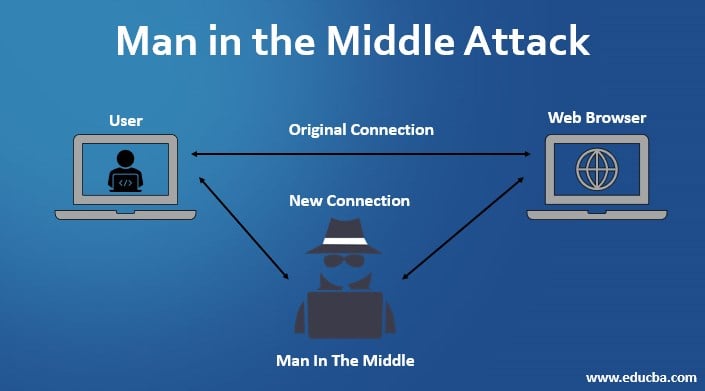
Have you ever passed a secret note in class, only to have the person sitting between you and your friend read it before passing it along? Or worse, what if they changed the words in the note? In the digital world, this sneaky behavior has a name. It is called a man in the middle attack.
Imagine you are trying to visit your bank’s website. You type in the address, but instead of connecting directly to the bank, your connection goes through a hacker first. You don’t see the hacker. Everything looks normal on your screen. But they are silently watching everything you do, stealing your passwords, and maybe even changing the data you send.
This guide is here to help you understand exactly how these attacks happen. We aren’t trying to scare you, but we do want you to be smart about your security. We will break down the technical jargon into simple terms, explain the different types of attacks, and most importantly, show you how to lock down your digital life. Let’s dive in and explore the world of cyber eavesdropping.
Key Takeaways
- Definition: A man in the middle attack occurs when a hacker secretly intercepts communication between two parties.
- Methods: Attackers use techniques like Wi-Fi eavesdropping, email hijacking, and DNS spoofing.
- Risks: These attacks can lead to stolen passwords, financial loss, and identity theft.
- Prevention: Using VPNs, avoiding public Wi-Fi, and checking for HTTPS can keep you safe.
- Detection: Slow network speeds and strange website addresses are common warning signs.
What Exactly Is a Man in the Middle Attack?
A man in the middle attack (often shortened to MitM) is a type of cyberattack where a criminal puts themselves in the conversation between a user and an application. The goal is usually to eavesdrop or to impersonate one of the parties, making it appear as if a normal exchange of information is underway.
Think of it like the post office. If you mail a letter to your friend, you trust the postal service to deliver it unopened. But if a malicious mailman steamed open your envelope, read your letter, perhaps changed a few sentences, resealed it, and then delivered it, you would never know. Your friend would receive the letter thinking you wrote it exactly that way.
In the digital world, this happens with data packets. When your computer asks a server for a webpage, that request travels through many points. If a hacker controls one of those points—often a Wi-Fi router—they become the “man in the middle.” They can see your login details, credit card numbers, and private messages. Understanding this concept is the first step to stopping it.
How Does a Man in the Middle Attack Work?
To pull off a man in the middle attack, a hacker needs to be in the right place at the right time. Usually, this means they need to be on the same network as you. This is why public places like coffee shops and airports are favorite hunting grounds for these cybercriminals.
Once they are on the network, the attacker splits the connection into two distinct connections. One is between the victim and the attacker, and the other is between the attacker and the destination (like a website). The victim believes they are talking directly to the website. The website believes it is talking directly to the victim.
The hacker acts as a relay. They receive data from you, record it, and then pass it on to the bank or social media site. When the site responds, the hacker receives that data first, perhaps alters it, and sends it back to you. This seamless relay makes the attack very hard to spot for the average user.
The Two Phases of an Attack
Generally, a man in the middle attack happens in two main phases: interception and decryption.
- Interception: The attacker traps the user’s traffic before it reaches its destination. This is often done by creating a fake Wi-Fi hotspot that looks legitimate.
- Decryption: Once the traffic is intercepted, the attacker must decrypt it. If the traffic is encrypted (like on HTTPS sites), the attacker might use special tools to strip away that security layer so they can read the data in plain text.
Common Types of Man in the Middle Attacks
Cybercriminals are creative, and they have developed several ways to insert themselves into your communications. It isn’t just one single method; it is a whole family of nasty tricks. Let’s look at the most common varieties you might encounter in the wild.
Wi-Fi Eavesdropping (The Evil Twin)
This is perhaps the most common form of a man in the middle attack. Hackers will set up a Wi-Fi network with a name that sounds very legitimate. For example, if you are at “Starbucks,” they might name their network “Starbucks_Guest_Free.”
When you connect to this fake network, the hacker has total control. They can see everything you send over that connection. Because you think you are on the safe coffee shop Wi-Fi, you might log into your email or check your bank balance. The hacker captures all those credentials instantly.
IP Spoofing
In this scenario, an attacker disguises themselves as an application or a legitimate user by altering packet headers in an IP address. It is like wearing a mask. The hacker’s computer tells your computer, “Hey, I am the server you are looking for!”
Because your computer trusts the IP address it thinks it is connecting to, it sends the data to the hacker instead of the real server. This is a more technical version of a man in the middle attack that often targets internal business networks, but it can affect individuals too.
DNS Spoofing
DNS stands for Domain Name System. It is like the phonebook of the internet. It translates human-friendly names like “google.com” into computer-friendly IP addresses. In a DNS spoofing attack, the hacker alters this phonebook.
When you type in “facebook.com,” a corrupted DNS server directs you to a fake website that looks exactly like Facebook. You enter your username and password, and the hacker steals them. You might even be redirected to the real Facebook afterward so you don’t suspect anything, but the damage is already done.
Why Are Public Wi-Fi Networks Dangerous?
We all love free Wi-Fi. It saves our mobile data and lets us work from anywhere. However, public Wi-Fi is the number one breeding ground for a man in the middle attack. Most public networks are unsecured, meaning the data flying through the air isn’t encrypted.
Even if a public network requires a password (like at a hotel), other users on that same network can often see your traffic if they have the right software. It is surprisingly easy to download tools that “sniff” the airwaves for data packets.
When you are at an airport or a library, treat the network as hostile. Assume someone is watching. Avoid logging into sensitive accounts. If you must use public Wi-Fi, use a Virtual Private Network (VPN), which we will discuss later in the prevention section.
Email Hijacking Explained
Email hijacking is a specific type of man in the middle attack targeting your inbox. Hackers compromise the email account of one party—say, a bank or a business partner. They then monitor the emails silently.
They wait for a specific moment, usually when money is being discussed. For instance, if you are buying a house and your real estate agent emails you wiring instructions, the hacker (who is reading the emails) might send a follow-up email from the agent’s actual account saying, “Sorry, use these new bank details instead.”
Because the email comes from a trusted address, you follow the instructions and send your money directly to the thief. This is highly effective and very devastating.
HTTPS Spoofing
You have probably been told to look for the little padlock icon or “HTTPS” in your browser bar to know a site is safe. HTTPS encrypts your data. However, hackers have found a way around this with HTTPS spoofing.
In this version of a man in the middle attack, the attacker tricks your browser into thinking a secure site is actually not secure. They downgrade the connection from HTTPS to HTTP. Your browser doesn’t show the warning signs you might expect, or you might just ignore a small warning because you are in a hurry.
Once the connection is downgraded to HTTP, all your data is sent in plain text, making it easy for the hacker to read.
Session Hijacking (Cookie Theft)
When you log into a website, the server gives your computer a “session cookie.” This is a small digital token that tells the site, “I am already logged in, you don’t need to ask for my password again.” This is why you don’t have to type your password every time you click a new page on Facebook.
If a hacker can steal this session cookie, they can impersonate you perfectly. They don’t even need your password. They just present the stolen cookie to the website, and the website lets them in as if they were you. This is a very sneaky form of a man in the middle attack.
Risks of Session Hijacking
- Account Takeover: The hacker has full access to your account.
- Data Theft: They can download your private photos and messages.
- Identity Theft: They can post as you or change your settings to lock you out.
The Dangers: What Can Hackers Steal?
The consequences of falling victim to a man in the middle attack can be severe. It isn’t just about someone reading your emails; it can ruin your financial stability and your reputation. Let’s break down exactly what is at risk.
1. Financial Information
This is the most obvious target. Credit card numbers, bank account logins, and PIN codes are gold mines for hackers. They can drain your accounts in minutes or sell your card information on the dark web.
2. Personal Identity
Your Social Security number, address, date of birth, and medical records can be used to steal your identity. Hackers can open loans in your name, file fake tax returns, or get medical treatment on your insurance.
3. Business Secrets
For companies, a man in the middle attack can result in the loss of intellectual property, future product plans, or sensitive client data. This can destroy a company’s competitive advantage and lead to massive lawsuits.
Table: Attack Types vs. Prevention Methods
Here is a quick reference guide to help you match the attack type with the right defense.
|
Attack Type |
What Happens? |
Best Prevention |
|---|---|---|
|
Wi-Fi Eavesdropping |
Hacker snoops on public Wi-Fi. |
Use a VPN (Virtual Private Network). |
|
DNS Spoofing |
You are sent to a fake website. |
Manually type URLs; check for HTTPS. |
|
Email Hijacking |
Hacker reads/modifies emails. |
Use Encrypted Email (PGP) & 2FA. |
|
HTTPS Spoofing |
Secure connection is downgraded. |
Use browser extensions like HTTPS Everywhere. |
|
Session Hijacking |
Hacker steals your login cookie. |
Log out of websites when done; use HTTPS. |
How to Detect a Man in the Middle Attack
Detecting a man in the middle attack is notoriously difficult because the whole point is to be invisible. However, there are subtle signs if you know where to look. Being observant can save you a lot of trouble.
Unexpected Website Behavior
If a website you visit often suddenly looks slightly different, be wary. Maybe the logo is pixelated, or the font is different. Or perhaps features that usually work are broken.
Security Warnings
Pay attention to your browser! If Chrome or Safari pops up a big red warning saying “This connection is not private,” do not click “Proceed anyway.” This is often a sign that someone is messing with the encryption certificate, a classic sign of interception.
Slow Network Speeds
Because your data has to travel through the hacker’s computer before going to the internet, your connection might feel sluggish. If the Wi-Fi is incredibly slow compared to usual, it could be congestion, or it could be a man in the middle attack.
Strange URLs
Look closely at the address bar. Does it say gooogle.com instead of google.com? Are there strange characters or typos? Hackers rely on you not reading the address bar carefully.
Top Tips to Prevent a Man in the Middle Attack
Prevention is always better than cure. You don’t need to be a computer genius to protect yourself. By following some basic hygiene habits for your digital life, you can make yourself a very difficult target.
1. Use a VPN (Virtual Private Network)
This is your best defense. A VPN creates an encrypted tunnel for your data. Even if a hacker intercepts your Wi-Fi signal, all they will see is gibberish code. They cannot read your passwords or see where you are surfing. It is essential when using public Wi-Fi.
2. Keep Software Updated
Hackers love outdated software because it has known holes they can crawl through. Keep your browser, your operating system, and your antivirus software updated. Updates often contain security patches that block new types of attacks.
3. Force HTTPS
Install a browser extension like “HTTPS Everywhere.” This forces your browser to always try to connect to the secure version of a website. It prevents hackers from using the downgrade attack we mentioned earlier.
4. Strong Router Credentials
If you are at home, change the default username and password on your Wi-Fi router. Default passwords are public knowledge and easy for hackers to guess.
The Role of Encryption in Safety
Encryption is the superhero in the fight against a man in the middle attack. When data is encrypted, it is scrambled using a complex mathematical formula. Only the person with the correct digital “key” can unscramble it.
Even if a man in the middle attack is successful in capturing your data packets, encryption renders those packets useless to the thief. They might have the data, but they cannot understand it.
Websites that use SSL/TLS (Secure Sockets Layer / Transport Layer Security) encrypt the connection between your browser and the server. This is why we stress looking for the padlock icon. It confirms that encryption is active. Never enter a credit card number on a site that lacks this protection.
Real-World Examples of Attacks
To understand how common this is, let’s look at a few scenarios.
The Coffee Shop Snooper
John goes to a cafe and connects to “Free_Cafe_Wifi.” He logs into his bank. A hacker in the corner is running software on a laptop that mimics the cafe’s router. The hacker captures John’s username and password instantly. John leaves with his coffee, unaware his account is being drained.
The Corporate Espionage
A CEO is traveling for business. She connects to the hotel Wi-Fi to send a confidential merger document. Competitors have hired a hacker to sit in the hotel lobby and perform a man in the middle attack. They intercept the document, learn the merger details, and buy stocks before the news goes public.
These aren’t movie plots; they happen every day. Awareness is your first line of defense. For more insights on tech and business security, you can always check resources at https://forbesplanet.co.uk/ which offers great advice on staying ahead of digital trends.
Man in the Middle Attack and Mobile Devices
We often forget that our phones are just small computers. They are just as vulnerable to a man in the middle attack as a laptop. In fact, they might be more vulnerable because we connect to so many different Wi-Fi networks throughout the day automatically.
Apps can also be a weakness. If a mobile app doesn’t use proper encryption when talking to its server, a hacker can intercept that data. Always download apps from official stores like the Apple App Store or Google Play Store, as they have stricter security checks.
Turn off “Automatic Connection” for Wi-Fi on your phone. You want to manually choose which networks you join so you don’t accidentally connect to a malicious hotspot while walking down the street.
Advanced Protection for Businesses
If you run a business, the stakes are higher. You aren’t just protecting your own data, but your customers’ data too.
Endpoint Security
Businesses should use advanced endpoint protection software that can detect traffic anomalies. If a computer suddenly starts routing traffic to a strange IP address, the software can block it.
User Training
Train your employees. Teach them not to click on suspicious links and not to use company laptops on unsecured public Wi-Fi without a VPN. Human error is the biggest security gap.
Multi-Factor Authentication (MFA)
Enable MFA everywhere. Even if a man in the middle attack steals a password, the hacker won’t have the second code sent to the employee’s phone. This stops the attack in its tracks.
Future of Man in the Middle Attacks
As technology evolves, so do the attackers. We are seeing more sophisticated attacks involving Internet of Things (IoT) devices. Smart fridges, thermostats, and doorbells often have weak security. Hackers can use these devices as entry points for a man in the middle attack to get into your home network.
Artificial Intelligence is also being used by hackers to automate these attacks, making them faster and harder to detect. But don’t worry—security experts are using AI too, to build smarter defense systems. It is a constant game of cat and mouse, but by staying informed, you stay on the winning side.
Conclusion
The internet is an amazing tool, but it has its dark alleys. A man in the middle attack is one of those dangers that relies on us being comfortable and a little careless. By understanding how hackers try to insert themselves into our conversations, we can lock them out.
Remember the basics: avoid public Wi-Fi for sensitive tasks, use a VPN, check for HTTPS, and keep your devices updated. It sounds like a lot, but once you build these habits, they become second nature. You hold the keys to your own digital castle. Keep the gates locked, and you can surf the web with peace of mind.
Frequently Asked Questions (FAQ)
1. Can a firewall prevent a man in the middle attack?
Not entirely. A firewall is great for stopping unauthorized access to your computer, but it cannot always detect if the data you voluntarily sent out is being intercepted halfway to its destination. You need encryption (VPN/HTTPS) for that.
2. Is incognito mode safe from these attacks?
No. Incognito mode only stops your browser from saving your history on your own computer. It does not encrypt your traffic or hide your data from a hacker on the network.
3. Does 2-Factor Authentication (2FA) stop MitM attacks?
It helps a lot! Even if a hacker steals your password via a man in the middle attack, they usually cannot replicate the second factor (like a code text to your phone), so they cannot log in.
4. How do I know if my phone has been attacked?
Look for unexpected battery drain, random reboots, or apps appearing that you didn’t install. Also, if your data usage spikes suddenly, it could be a sign of malware communicating with a hacker.
5. Is my home Wi-Fi safe?
It is safer than public Wi-Fi, but only if you secure it. Change the default password, use WPA3 encryption if available, and keep your router’s firmware updated.
Stay Informed With the Latest & Most Important News
Previous Post
Next Post











Advertisement